SUPERAntiSpyware is available as a free and professional edition. Both editions are downloadable directly from the developer website. Lets take a quick look at the differences between SUPERAntiSpyware Professional and SUPERAntiSpyware Free.
Both editions support the detection and removal of all sorts of malicious programs including malware, trojans, worms or keyloggers. Users can add files and folders to a whitelist so that they will not be processed during scans.
SUPERAntiSpyware Professional on top of this offers the following features that are not available, or limited, in the free edition:
- Ability to repair HiJacked web browsers and system settings, e.g. resetting the home page, enabling the task manager, broken network connections or desktop policies.
- A feature called First Chance Prevention which analyzes 50 critical points on system start and shut down to eliminate threats before they have a chance to infect the system.
- Threat realtime blocking by monitoring the Windows PC and processes.
- Registry protection against web browser hi-jackers and other threats.
- Auto-scanning on application startup.
- Automatic update checks and definition updates every 8 hours.
- Daily definition updates.
- System diagnostic to locate new threats on the PC.
SUPERAntiSpyware Professional Review
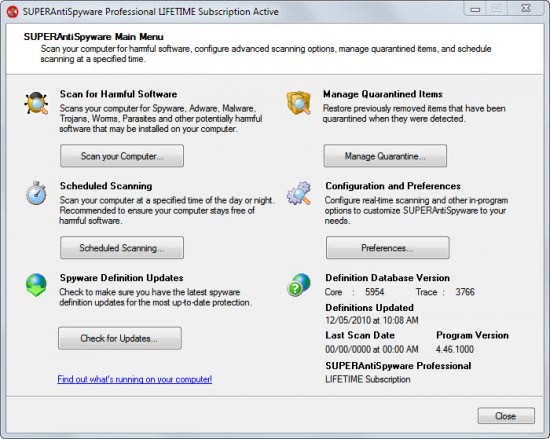
The security software displays a clean interface on startup. Users can press on buttons to perform manual operations. This includes scanning the system for harmful software, configuring scheduled scans, managing the quarantine, editing the program preferences and checking for updates. Update and license information are displayed there as well.
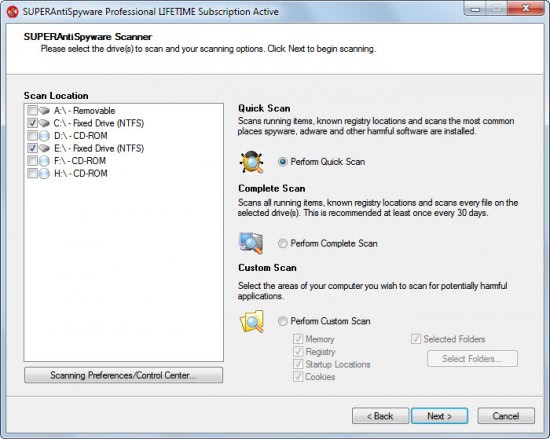
A click on Scan your computer opens the scan menu with options to scan the whole computer system or just a specific drive for malicious programs. SUPERAntiSpyware Professional users can perform a quick scan of the Windows PC, perform a complete scan or custom scan.
The quick scan scans all running programs and processes, critical Registry locations and the most common places on the connected hard drives for harmful software. The complete scan adds the selected drives to the scan list. Custom scan finally can be used to scan specific areas of the operating system (like the Registry or memory) and selected folders.
A system scan takes a while, depending on the speed of the PC and the selections that have been made. The quick scan took a few minutes to complete and results are displayed in detail on the results page. Each possible file and location found are categorized in groups and listed with their local path on the PC. It is possible to unselected items from being cleared, add items or locations to the list of trusted items, report false positives, manage the trusted items list or explain one of the detected items.
Especially the explain detected item can be helpful considering that it is not always clear why a file is being marked as being malicious. This loads a page on the SUPERAntiSpyware page with additional details about the selected item. It still may take more research to find out about a specific item. It is for instance a good idea to upload files to Virustotal for a second opinion.
All selected items will be removed by SUPERAntiSpyware Professional, and it may take a reboot of the system to clean them completely from the system. If it does a reboot is suggested by the security software to complete the process.
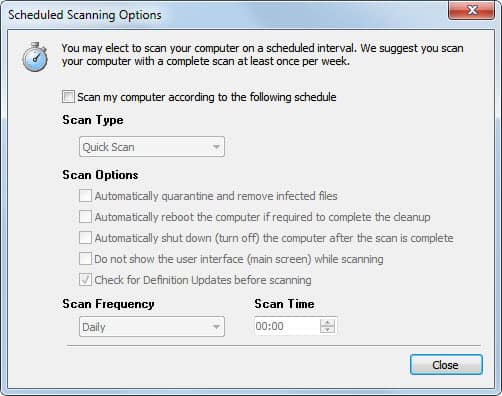
Scans can also be scheduled in specific intervals, for instance daily at a specific time or once a week.
All removed items are added to the program’s quarantine from where they can be restored or completely removed.
The control center offers extensive configuration options. Users should especially pay a visit to scanning control which displays scanning related settings. It is for instance possible to include non-executable files in the scan, files that are larger than 4 Megabytes or to terminate memory threats before quarantining them.
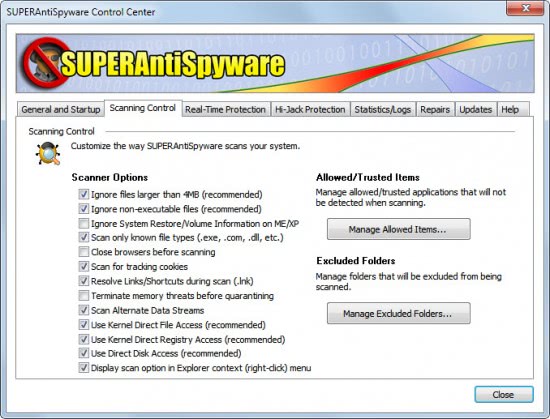
Other control center options include the previously mentioned repair options, real-time protection settings and access to scanner logs.
The program is very light on resources while running in the background. It used just a little over 1 Megabyte of system memory. Memory usage can peak at a few hundred Megabytes however during scans, but that is only temporary.
SUPERAntiSpyware Professional Installation
Users can enter the registration code during installation. Privacy conscious users need to pay attention to the installation dialog as system information may be submitted to developer servers to optimize the software. Disabling the option during installation prevents this from happening. The security program is compatible with 32-bit and 64-bit editions of all Windows operating systems from Windows 2000 on.
400Mhz or Faster Processor with at least 256MB RAM
http://www.superantispyware.com/download.html


![rapidleech_thumb[2]](https://blogger.googleusercontent.com/img/b/R29vZ2xl/AVvXsEj4xmMUCQJ799AtkcovfGrjf_q0ZYSbUXi8K84Y-6yYSWYeO0SukzLceJ52kkl7VKwacXDPle2QIjnZIInzMt7-nZfvRCC3mnP2amPkByhcS5TK0AmYC5u83GhvlasTynKV4oqHhqR7NvEn/?imgmax=800 "rapidleech_thumb[2]")

